Tuesday, 27 December 2011

How to Earn 10 Dollars Per Day from Adsense

Google adsense is the main money making program most of the bloggers use initially. Unfortunately it doesn’t work how you expect. I still remember those days I used to check my adsense earning every one hour to see whether anyone clicked my ads and how much I earned. Most of the time, it disappointed me. I’m sure most of the newbie bloggers will be doing the same thing. Then, I started investigating the time and work involved in earning 10 dollars daily from adsense. I found nice suggestions in internet for my doubt. In this post let me explain how to earn 10 dollars per day from adsense- its from my experience.
The interesting suggestion I found is, creating 10 websites which can make 1 dollar per day, so at end of the day you earn 10 dollars daily from adsense. Sounds cool?, but who will create 10 websites?. Making 10 dollars per day is very much possible with your single existing blog or website.
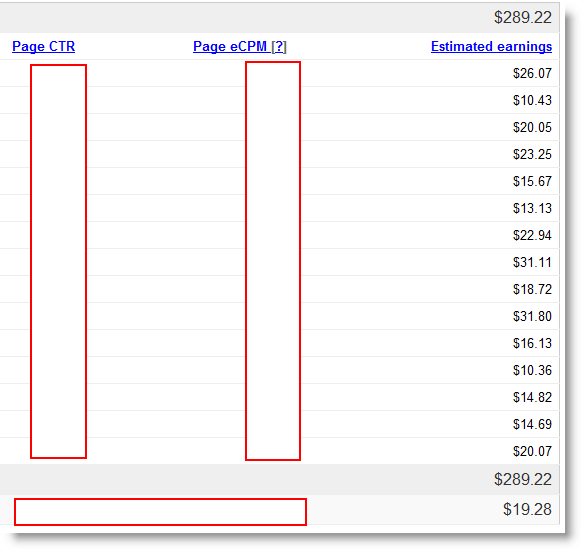
feb_report
I crossed this mark already, now I’m targeting for 20 dollars per day from adsense. So, from my learning and experience, here are the points to earn 10 dollars daily.

1) Your niche and keywords are very important.

Your blog should have high paying keywords. Your each click must bring 1 to 3 dollars per click, that would be great keyword selection for make money from adsense. Some ads will bring 0.01 dollar too. Finally the average earning per click can be 1 to 3 dollars by good keyword selection.
Read more here to find out high paying keywords.

2) Your blog may require around 3000 visits via search engines daily.

Organic traffic is very important to make money from adsense. As per our earlier calculation mentioned in this post, your blog require around 3000 search engine visits and 4800 Page views totally daily to reach 10 dollars daily.
Check my earlier calculation on earn first 100 dollars from adsense.

3) Use above the fold ad placement

No matter how many ads you are using in your blog, make sure at least one ad is placed above the fold. ‘Above the fold’ is the place any visitors see without using scrolling bar in internet browser. I think the ad with 300×250 or 336×260 below head line and above (or wrapped by) content works better for high CTR and eCPM. Google serves high paying ads to the ad slot which is loading first in a blog. So, make sure to utilize this ad slot well to earn your 10 dollars daily from adsense.
Other tips to increase adsense earnings are very common and available all over the internet.  The main thing is, number of visits and traffic source.
3000 daily visits via search engine can be different for each blog depends content, ad placement and niche/keyword selection. If you have high paying keyword and getting good search engine traffic for particular keyword, then may be two or three clicks enough to earn 10 dollars daily.
What ever I mentioned here, it is just an estimate to understand the requirement of earnings 10 dollars per day from adsense.
Do share your thoughts about this estimate. If you are making daily 10 dollars from adsense, just compare with your traffic and share your comment on this.

How Long Takes to Earn First 100 Dollars from Adsense –Simple Calculation

This is the question I asked in so many places when I was new to adsense and blogging. But couldn’t find the answer technically. Even now no one can answer this question straightly and exactly, because it is completely different for each blog. I decided to put a formula which may give rough idea to how long takes to earn first 100 dollars from adsense.
How Long Takes to Earn First 100 Dollars from Adsense
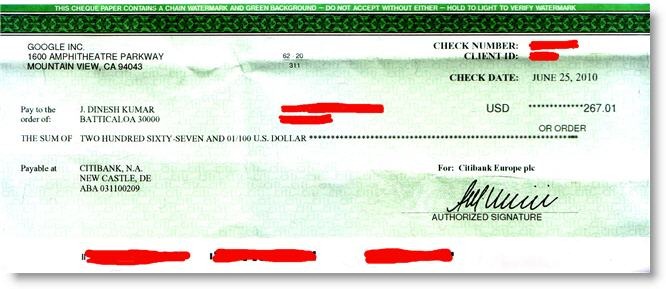
In my experience, Google adsense is the good program to make money from your blog till you become pro blogger to create your own product or start affiliate marketing. Getting the first payout 100 dollars is the very painful period for any bloggers. It took 29 months to reach 100 dollars for me ( Yes, I had some gaps in my blogging life), but now my earning is 3 to 4 times more in single month.
Ok, Lets go to the point. This is a rough and average calculation. Do not think I’m directly publishing my adsense stats and figures here, its against Google adsense TOS.
Other than earning amount, there are two (in fact, three in new interface) factors decide the performance of adsense, which are CTR ( Click Through Rate), Page CPM( Cost Per Mile). RPM is new factor ( Revenue Per Mile), but we are not going to talk about it here.
CTR is pointless in our calculation.
So, its all with CPM. Adsense CPM means, how much average you earn from every 1000 page impressions with adsense ads ( no matter how many ads on them)
So, if you earn 5$ from 2500 page impressions, your eCPM is,
(5/2500)*1000 = 2$
You earn 2$ from every 1000 impressions.

Here is the point, I can’t tell how much is the best CPM for adsense, it completely depends on your blog niche and traffic source.
In my experience and what I read from other blogs, 1 to 2 will be an average CPM for most of the bloggers.
If its less than 1$, then you are doing something very wrong with adsense, or you are leased bother about it.
If you are getting more than 2 or 2.5$ eCPM continuously every month, then you are a great guy with adsense.
In our case, we will take 1.5$ is average eCPM and to make the calculation easy, we will do it for first 105 dollars.
So, with 1.5$ eCPM to earn 105 dollars, you need 70,000 page impressions.
(1000/1.5)*105 = 70,000
This figure can be less or more for you, because it depends on your visitors type who make these impressions.
So, lets go to the next step.
When a visitor visits your blog, he or she checks average 1.5 pages on a blog.
To get 70,000 page impressions, you need 46,667 visitors.
(1/1.5) * 70,000 = 46,667
Again, this 46,667 visitors can be from direct, referral, social networking and search engines sources.
As you must aware, search engine traffic users will be useful for any CPC programs including Google adsense. They click ads. Your regular visitors can close their eyes and browse your blog without clicking ads, because they know your blog already.
65% to 75% search engine traffic will be healthy for a blog in my opinion. In this example, we will take 70%.
So, in 46,667 visitors, you need 70% of organic traffic, which is 32,667 visitors
(70/100)*46,667 = 32,667

Wow, that’s a big number.
Now you can get rough idea based on your average eCPM and daily search engine traffic to know when you will get first 100 dollar adsense check.
I did not open my adsense earnings and Google analytics to compare and write this calculation. But the figures I mentioned is roughly from my experience and what I saw in other blogs and eBooks.
If you are getting 100 average daily organic traffic visitors, then it may take around 10 months to get your first 100 dollar from adsense. ( 100*30*10=30,000)
But one thing, you will not maintain the same 100 daily organic visitors for next 10 months, correct?. When you update your blog with unique content and well optimized for search engines, these 10 months can be 3 or 4 months.
Finally, it all depend on your adsense optimization to get high CTR and eCPM, organic traffic and keyword selection. But to know these techniques, it will take some time for new bloggers.
If you think this calculation is wrong, feel free to share the reason. Still if somebody is not making any money from adsense after this much traffic, the contact me. I will try to help you.
Have a nice blogging.

What is RPM in New Google Adsense? How to Increase RPM?

New Adsense interface rolled out for all users recently. It looks promising and useful. I like it. This is the first time I’m seeing a different a interface after three years. It’s with more details and easy to understand format with graphs. There are some new factors make confusion in first screen. What is RPM in new Google Adsense interface? Its very simple, “Revenue Per Mile”.
It means, Revenue Per 1000 impressions. So what the difference between eCPM and RPM in adsense?. There is a difference. eCPM is calculated by Page impressions whereas RPM by ad impressions.
 RPM in New Google Adsense
Old AdSense interface shows the total page impressions with adsense ads, no matter how many blocks or units in it. But, latest interface shows the total number of ad impressions and RPM is according to it.
For example,
You have 3 ad blocks on each page and one day you earned 20$ with 10000 Page impressions.
So, average eCPM is = 2$
(Earnings/Page Impressions) * 1000 =  (20$/10000)*1000
What’s the RPM in this case?
New interface will show 30000 impressions, because each 10000 pages got 3 ad blocks.
So average RPM is = 0.67$
(Earnings/Ad Impressions)*1000 = (20$/30000)*1000
Need some prove?
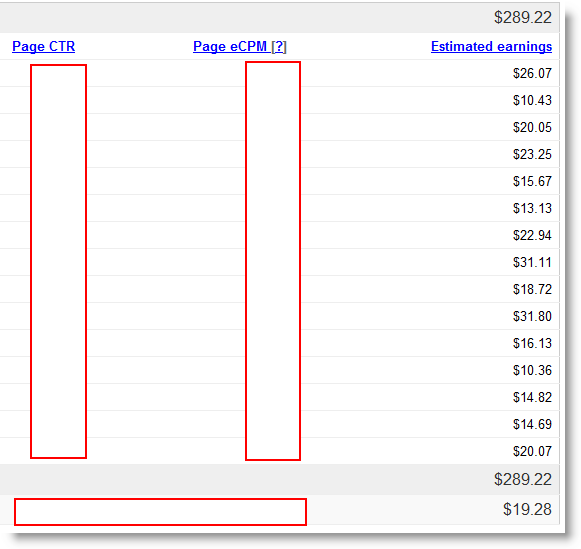
Here is the stats from new interface for today.
 RPM in New Google Adsense
For same, old interface shows as below.
Increase adsense RPM
I have three ad blocks on each posts except home and other pages. That’s the different. So, page eCPM and RPM are totally different amounts for me.
I’m sure this will give some idea. I could see in other blogs that they say RPM in adsense is calculated by number of visitors and page views, but actually its from ad impressions.

How to Increase RPM in Adsense?

It can be done in two ways.
1) Reduce the number of ads (not performing) on your blog. Of course it will reduce the earnings, but RPM will be increased.
2) Increase your earnings with same impressions.
Check the 9 reasons for making money from adsense is difficult nowadays, but you can make it.

Quick & Simple tips to improve the earnings. ( I will be covering all points in detail very soon)

1) Above the fold.
2) Don’t place all ads in same screen when your reader is reading.
3) Don’t blend too much with your theme style. Let them know it’s a link and ad.
4) Consider to improve Search Engine traffic.
5) Block the un related ads
6) Remove the ads which is appearing in all slots. ( they are paying less)
7) Try the recommended ad size formats. Do not try anything new with new ad sizes.
8.) Use section targeting.
9) Experiment and test, but don’t decide anything quickly. Give minimum one week.
10) Insert high paying keywords in your blog related to content.
Let me know your thoughts.

Why Making Money from Adsense is Difficult ?

Adsense is one of the famous program most of the bloggers use to earn money at initial stage of blogging. It was doing well for bloggers when it was new in web. But currently, making money from adsense is not that much easy, except you have huge search engine traffic. Here are the 9 reasons why making money from adsense is difficult. google-girl
It took 29 months to earn my first 100 dollars, now in a single month I managed to earn around 400 dollars from same. So, what are the problems in it and what I learnt. Keep reading.

9 Reasons

1) All know about it.
Almost all internet users know it’s an advertisement from Google. Most of the  PPC (Pay Per Click) programs known by internet users. So, they don’t click without knowing  or having interest on  ads on your site.
2) Less Traffic
Since getting clicks on ads are very less compare to earlier, you need more traffic (visitors). Still lots of bloggers earn huge money from adsense and it’s a main income source for them. So, how it’s possible? because of traffic. You must have enough organic (Search engine) traffic. I would say, minimum 1000 daily unique visitors by search engines will give reasonable income. Are you getting this much traffic?
3) Ads are not relevant
Sometimes ads are not relevant to your blog posts. When you are talking about Windows 7 wallpapers on a article, Google will publish ads about ‘How to make cheap phone call?’. Who will have interest on this ad?
4) Low Payments
You may get even 0.01 US Dollar for a click. It’s very low compare to how hard you tried to get that click. There are some methods available to stop low paying advertisers from your site. But it doesn’t work how you expect.
5) Keyword Selection Mistake
Sometimes, no matter how hard you try to avoid low paying advertisements but still you can’t make good money from adsense because of ‘Low paying keyword’. When other bloggers earn 20 dollars from 10 clicks you may earn 1 US dollar in same 10 clicks. Why? It’s because of your low paying keyword selection.
6) Wrong size ,placement, color combination, no monitoring
Your adsense ad placement and color combination should be perfect and match with your blog style and theme. Don’t miss even a single click by wrong ad placement and color system. You have to work around with your blog and ads to find out the correct format and placement. Its a time consuming experiment but useful.
To increase your adsense earnings you must monitor it. Create channels and monitor which ad format is making real money and in which page. Then get rid of low earning ad formats.
7) You don’t have Control on Adsense.
You don’t have control to select high paying ads and advertisers. Changing colors and sizes also limited. So you can’t hide ads completely with your blog as part of your links. You have to allow ‘Ads by Google’ in every adsense advertisement.
8.) Limited Numbers of Ads.
It’s not a good idea to place ads all over the places in a page. But still if you think you can make more money by more ads and your all posts are very long, sorry it’s not possible.  Google allows adding only 3 ad blocks and 3 ad units on a page.
9) Don’t depend only on Google as Search Engine.
You must optimize your blog to yahoo, bing and ask search engines. One study said visitors coming from other search engines except Google, click ads more due to not familiarized with Google adsense. I don’t know how much it’s true, but I think it’s quite right
Conclusion; Making money from adsense is a difficult task but its ‘Very much possible’.
Once you establish your blog well and optimized for search engines, then you should not worry about it. Earnings will follow you.

Three things more important for adsense according to me,

Organic traffic
Keyword Selection.
Ads size, color and placement.


To encourage you, check it out the top adsense earners here.
I will be updating this blog with more tips to make good money from adsense. Stay tuned.
What’s your experience? are you making good money by adsense?

[Must Read] How to Increase Adsense CPC – Simple Tips

Recently one of my reader asked a question about the CPC he receives for each click from adsense. He is getting around 0.01$ per click (yes, its very low). He asked me to check his blog for some suggestions. I found out the possible reasons for low CPC. In this post, let me explain simple tips on how to increase Adsense CPC.
Increase Adsense CPC

What is Adsense CPC?

CPC is ‘Cost Per Click’ in average. Let’s say, you get 0.02$ for one click and 1$ for another click, so your average CPC is (0.02$ + 1$ )/2 =  0.51$. CPC is a another factor in Adsense to decide the performance along with eCPM (Effective Cost Per Mile) and CTR (Click Through Rate).
You must try the possible methods to increase the CPC in Adsense to maximize the revenue. Increasing the CTR also will help, but when CPC is low with high CTR, still there will be less earnings.
For example, instead of getting 10 clicks at 0.02$ CPC ( 10 x 0.02$ = 0.2$), try to get 2 clicks at 0.50$ CPC which is 2 x 0.50$ = 1$, much better isn’t it?. So, your CTR is less ( 10 to 2), but final earning is much better ( 0.2$ to 1$) because of good CPC ( 0.02$ to 0.5$). I hope you got my point.

Let’s See How to Increase Adsense CPC


1) Concentrate on Keywords, niche and topic
Not all types on content shows the same types of ads. Advertisers pay(bid) more money on particular keywords which will pay good CPC. You must find out the high paying keywords for your blog topic and write about or include them in your blog posts. Google Adsense robots scan your content before display ads, if they find the valuable keywords and useful content, then Google will serve high quality ads.
See Also,
How to find high paying keywords for Google Adsense
This doesn’t mean, you have to write only about high paying keywords. Getting search engine traffic to high paying keywords is very difficult since it will have more competition.
You write what you know and like to write, but keep in mind about high paying keywords and include them in few places.
Also, you have think about the potential advertisers and competition of the topic you write. Let’s say you are writing about free stuff, then you may possibly get less CPC, because none of the advertisers will pay high payout for free stuff which they can’t sell. Keep in mind!, each advertiser who is advertising though Google (Adwords) which display as Adsense ads in our blogs, need our visitors to their product page and convert them to sale, registration, or any action.

2) Enable Image and Text Ads.
Some people do not like image, Rich media ads in their blog posts, because they expect adsense ads to show like a link (text link). In my experience, image and multi media  ads works well in all the places. If you have Text only ads, make them to image and text. You can see the different in next two weeks. I experimented several times and several places, then decided image and text ads works well. Google highly recommends Image and Text ads.
Here are the few reasons,
  • Image ads are likely to be clicked (High CTR)
  • All famous advertisers and product owners like to show their brands and products as an image or rich media, so this might bring quality ads and good CPC.
  • Only one image ad can be shown at a time instead of showing 3 to 4 text ads. This may possibly a good CPC ad.
  • More advertisers will target your ad slots directly if you allow image and text ads though Adwords or Google Ad Planner.

3) Too many Ads – Less CPC
Are you using all three adsense ad blocks? if yes,is it balancing your each post content?. I recommend to use all three ad blocks if your blog posts are long enough to accommodate these slots and with valuable keywords available to feed Google adsense robots.
If your articles are too short and not having rich keywords, then Google will struggle to show relevant, high paying, and interested ads for the visitors. At the end, you get clicks but no earnings because of low paying, non relevant and some times public ads too.

4) Monitor your Higher CTR Ad with Custom Channels
Channels are very important here. This gives the clear idea of which Ad slot is performing well, measure CPC, eCPM , CTR and earnings of particular ad block. Create custom channels for each ad slot in your blog and monitor the performance for  two weeks.
How this helps in increasing Adsense CPC?
  • Remove the low performing Ad slot from your blog ( Decide by CTR and final earnings) for testing purpose. Now, Google may serve better ads to other two ad slots which is performing well, so your earnings will increase.
  • Go to Next point.
5) First Ad unit in HTML Code Serves better ads
You may have one ad in header and other one inside post content, which ad will load first in your blog page? Obviously  the ad in header, because that is at the first place in HTML code. Normally Google servers quality and high paying ads to first ad slot in a webpage, so in this example, it will be the header ad.
So, the next question is, is your header ad getting good CTR? here is the clash. When your ad block inside content is getting good clicks (higher CTR) than header ad, but still Google will server good ads in header. So you are wasting some of the possible clicks here.
To fix this issues, Google suggests to ad your important ad slot inside div tag, which is explained clearly in Google help page here. Adsense robots will serve highly quality ads to the block with div tag no matter where it is located in HTML code. Use div tag to the good performing block which you decided by custom channels in early step.

6) Reduce Accident, Fraud and Useless Clicks
Don’t think you can make good money by clicking your ads from different IPs, ask your friends to click and anything like it. Google is very smart to find out these types of clicks and they will ban your account. Also, just clicking ads and closing the advertisers’ page immediately will be notified to Google. Google is much concern about their advertisers also, if your all clicks work like that without any benefits to advertisers what they expect, then Google might put your website in lower place where low quality ads will be served.
In long term plan, make sure Adsense ads are look like advertisements in your website and your visitors are interested and clicking ads to visit advertisers page purposely. Do not blend too much with your theme and expect some accident clicks. You can’t survive with accident, fraud and quick browser closing clicks in long term with Google adsense. This definitely effects the CPC, when your blog visitors converted well by advertisers with quality clicks, then you may get quality high paying ads.

There are few more techniques available to increase Adsense CPC, I think it will be useful once your blog started generating good traffic. I will publish them later in this blog. Stay tuned.
Believe me, a blog or website need time to generate reasonable income from Adsense. It’s not easy, but very much possible. The reader on mine, who contacted me, is having one month old with good traffic and by average he get 4 clicks per day which is very impressive. But it will take some time to earn stable income with Adsense.
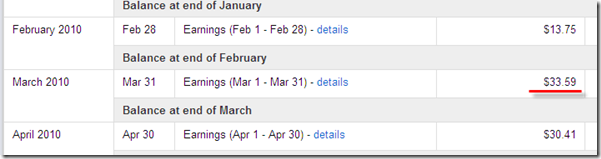
Here is the real example, when I look back one year ago exactly on March 2010, my monthly earning was 33.59$.
How to Increase Adsense CPC
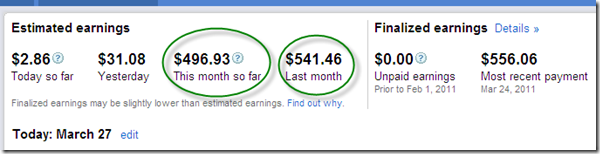
Here is the current earning exactly after one year, around 550$ monthly with same single Blog.
How to Increase Adsense CPC
How I Did?
  • Keep producing content
  • Write for you and your readers
  • Generate good traffic from search engines
  • Don’t’ put all ads in one place
  • Don’t try all money making methods at a time
  • Experiment the ad positions and colors but don’t over do it again and again
  • Finally don’t motivate your self in blogging only for money.
Be a good bloggers to your readers, other bloggers and yourself – you can be a successful blogger in short time.
Feel free to drop comments and keep visiting DailyBlogMoney for more information.
Good luck guys.

How to Find High Paying Keyword for Adsense

If you are using Google adsense in your blog as a monetizing method, then you must be aware of high paying keywords. Every keyword is not paying the same amount for each clicks. Therefor, it’s advisable to find and insert high paying keywords in your blog or posts. Let me show in this post how to find high paying keywords for adsense.
The simple and free tool we can use for this purpose is , Google keyword tool. It’s a free product for adsense users. Google keyword tool is not designed for publishers like us, it’s designed for advertisers who are looking to advertise through Google adwords. But, as publishers and bloggers we can utilize this product to find the high paying keyword for adsense.
Ok, lets go with an example.
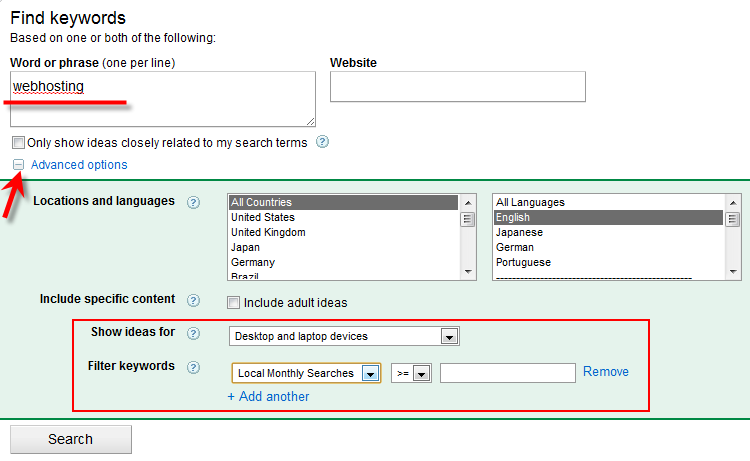
If you are planning to write a post about “Webhosting”, go to Google keyword tools and enter the keyword phrase.
Find High Paying Keyword for Adsense
Some filter options are available under Advanced options.
Once you press the Search button, it will list out  the keywords related to search term. The fields are easy to understand.
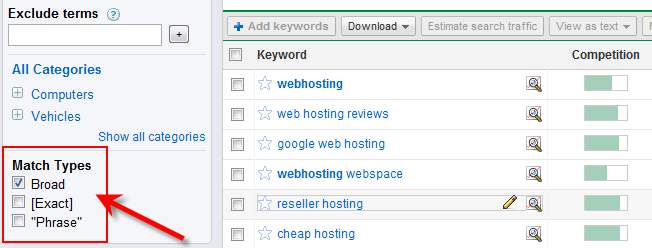
If you still can’t find the very suitable keyword for ‘Webhosting’, this can be filtered by Match Types in left side.
Find High Paying Keyword for Adsense
Remove the ‘Board’ type and select either Exact or Phrase.
‘Exact’ will bring the more relevant keyword for your search term.
“Phrase” will bring the same search term text in keywords.
But, we are here to get the high paying keyword related to ‘Webhosting’, so first do not not change any filter types under Match Types.
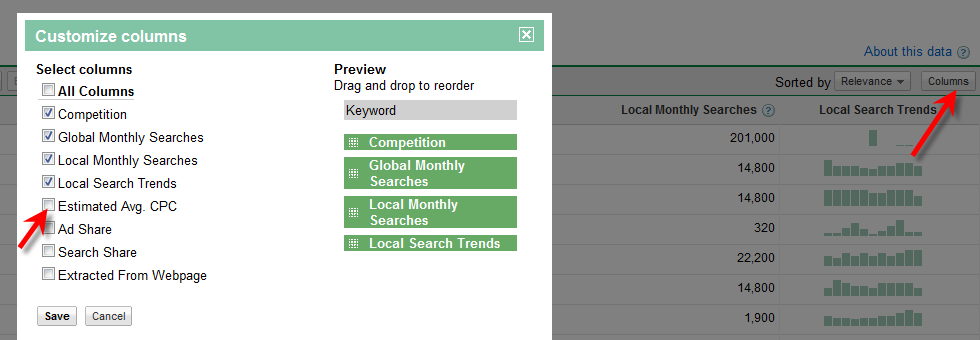
The first result screen in Google keyword tool doesn’t show the Estimated Avg CPC ( which decides the value of keyword), we have to enable this column by doing following steps.
Click on columns in right side of menu bar and select the Estimated Avg CPC.
enable_estimate_CPC

What is Estimated Avg CPC?

As I said earlier, this tool is for advertisers. If I’m a advertiser and want to advertise my product or service through Google adwords, then I have to select some keyword for each ad slots.
For example if my main keyword for this ad campaign is ‘webhosting’, then I  have to bid (pay) more than Estimated Avg CPC for ‘webhosting’ keyword for a click to beat the competitors.  So, my ads will be displayed in Google’s first search result (Search results related to webhosting), top blogs and blog posts related to ‘webhosting’.
So, obviously high Estimated Avg CPC means, high pay out for publishers also if we get the correct ads.
Now click on Estimated Avg CPC column to sort the filed.
final result
Here you have to understand something clearly and select the correct keyword.

Competition

Again this is not for us, this means the competition between advertisers, there are more advertisers bidding and advertising on this keyword.
If you want to find the competition for specific keyword as a blogger, then just simply type this keyword in Google and see the number of search results found.
The arrow mark I showed next to Competition column will give more ideas on this keyword about trend and history from Google Insights. It’s another handy tool for bloggers to find out the good keyword and niche for a blog or post.

Global and Local Searches

This should be considered too. If you target only high paying keyword but no one is searching that, then its pointless and you can’t make any money from adsense.
You should be very smart to select the correct high paying keyword. If you select the high searched keyword, then it will have more competition. Getting in to Google’s first page for this keyword is not at all an easy task.
In this example, I would prefer to write about ‘ Top web hosting’. Its having high paying keyword with good search history.
But unfortunately, its having more competition with 140,000,000 results (as of today). so I don’t think I can beat them.
search result
In this case, I follow my own way to utilize this high paying keyword to monetize my blog posts with adsense.
I will write that technique in coming days.
Feel free to drop your comments and suggestion about these steps.
Are you using Google keyword tool for your daily blogging activity? and how much do you trust this free service?

Show floating ads Below Post title

In this tutorial I will explain how to place Adsense ads below post title in Blogger Blogs with lots of customization tips. You might have noticed that most of the bloggers show Google adsense ads below title to increase their Click through rate and earnings.
According to Google adsense help pages ” Where to place adsense ads ?“. Placing adsense ads below title and above article content can bring high ctr and performance.
Adsense ads Below post title
This “heat map” illustrates the ideal placing on a sample page layout. The colors fade from dark orange (strongest performance) to light yellow (weakest performance). So it’s clear from the heat map that the adsense ads below post title can bring high ctr.

How to add Adsense ads below post title ?

It’s really very easy to add adsense ads below post title in blogger. Inorder to add adsense ads below post title ,just follow the below steps.
Before adding the adsense ads to blogger templates , we need to encode our adsense ads code.If you add the adsense code without encoding then you can’t see any adsense ads below post title.

Encoding Adsense Ad Code ?

To encode adsense ads, first create an adsense ad and then visit centricle website to encode. In centricle web page , you need to paste your adsense code in the text area and then click ” Encode “. Copy the encoded code. Now your adsense code is ready to be added to blogger template.

Adding adsense ad code to blogger template

step 1 : Go to layout section of your blogger template and then navigate to EDIT HTML sub tab. There check the “Expand Widget Templates “.
step2 : Look up the following tag : <p><data:post.body/></p> and paste the encoded adsense ad code above that tag.
Then click save. That’s it Now we have added the adsense ad code below the post title in blogger blog successfully.

Customizing Adsense ads

Here are the few customization tips , which you can apply to increase your CTR.You might have seen that most of the bloggers will show more than Three posts in home page / labels page / archives page. But as per adsense TOS we can show only Three ads per page. So due to this we will see some blank spaces between post title and content , when the three adsense ads are already loaded.In order to avoid this error , we can show adsense ads only in Post pages i.e pages containing articles.

Showing adsense Ad only in Post pages

In order to implement this hack in your blogger template. you need to change the encoded adsense ad code to this.
  1. <b:if cond='data:blog.pageType == &quot;item&quot;'>Encoded Adsense code here</b:if>  
Now paste this code above <p><data:post.body/></p>

Making adsense ads to Float

After adding the adsense ad code to your templates , you can see that by default the adsense ad code will not allow any text to be shown nearby it.

So in order to overcome this error , we need to add some CSS codes to make adsense ad code to float either left or right.
For this we just need to modify the encoded adsense code to be added in step 2.
replace that encoded code with this one :
  1. <div style="float:left;padding:5px;">  
  2.   
  3. encoded adsense ad code here  
  4.   
  5. </div>  
Change the text in red to make adsense ad to float either to left or right.

My suggestion

According to me , instead of showing adsense ads in all pages ( home page , archives page and labels page ) , we can show adsense ads only in post pages to increase our ctr.
Hope you guys will like this hack. If you need any more customization , then give me your suggestions via comments.